In Shark Tank, your on-air 60 seconds can spark interest, but what you can’t rely on is whether that interest sticks. This guide shows how Shark Tank founders can use Sora 2 to transform a 15-minute TV cameo into a shareable video that drives conversion with no production crew required.
Sora 2, a text-to-video model made by OpenAI. It can aid founders in generating video content using images, video inputs, and prompts. Below is a deep dive into how Shark Tank founders can leverage Sora 2 to develop promotional content, storytelling, and pitching.
What is Sora 2?
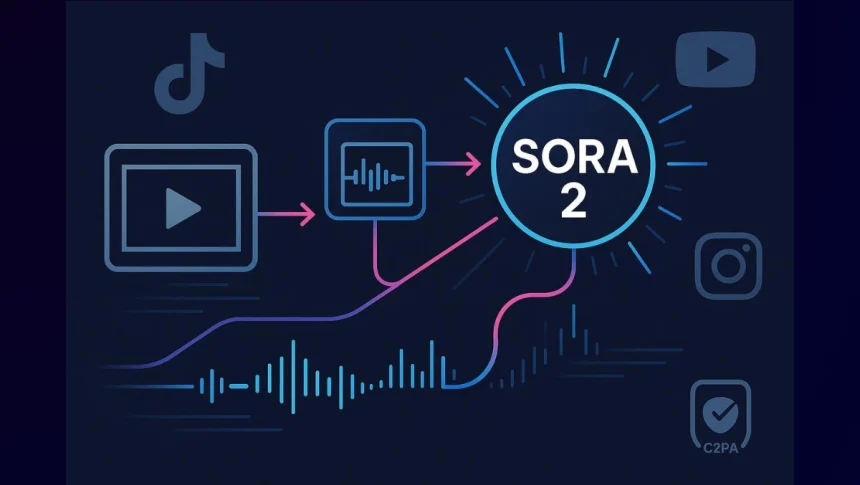
Sora is a video generation model of OpenAI that transforms text, videos, or images into new ideas. The second version, Sora 2, enhances realism, improves audio-video sync, and introduces new controls and capabilities.
It is linked to a new app that allows users to generate short, shareable clips in a TikTok-style feed. The model supports video lengths up to around 20 seconds (or in some contexts, slightly longer), depending on prompt complexity.
OpenAI also layers copyright and content control mechanisms. By default, copyrighted material may be used unless rights holders opt out, though there are efforts to give more granular control to content creators.
For founders, Sora 2’s key promise is the ability to rapidly prototype and generate video assets without needing a whole production team or camera equipment.
Why Shark Tank Founders Should Care
Here are various reasons why founders coming on Shark Tank should use Sora 2;
- Speed : Instead of waiting for days or weeks to shoot a video and edit it, founders can test different video concepts and product demonstrations.
- High polish: Even if you do not have professional expertise in video production, Sora 2 can bestow visually appealing scenes when helped with good prompts.
- Interactive storytelling: You can generate multiple versions of a video and refine by adjusting prompts and inputs.
- Consistency : You can redesign a basic prompt into various formats to maintain branding consistency.
- Pitch: Crispy, and well-designed scenes can help a pitch deck stand out. A founder can even embed and share a Sora-made demo video.
4-Step Production Workflow
Below is a stepwise workflow you can follow to go from concept to polished video using Sora 2.
Step 1: Mention Your Goal and Use Case
Start with what you want the video to do:
- A “hero” product demo for investors.
- A brief explainer for customers.
- Social media teaser (Reel, TikTok, Shorts).
- Brand storytelling montage (founders, mission).
Step 2: Prepare Prompts & References
Sora 2 responds to text input and optional media inputs. The better your prompt and reference visuals, the more tailored the video.
- Text prompt: Describe the scene(s), lighting, camera angle, subject actions, mood, and transitions.
- For example, “A sleek product demo of our smart bottle on a white pedestal, camera circling, soft spotlight, close-up on label, voiceover: ‘Introducing AquaSmart’.”
- Image/reference input (optional): You can upload an image of your product, brand logo, or even sample frames to guide the rendering. This helps maintain consistency with your visual identity.
- Storyboard or sequence plan: Sketch or list the shots you want: intro, close-ups, feature callouts, transition, closing. You can feed Sora prompts sequentially to generate scenes.
Step 3: Generate & Iterate
Use the Sora interface (or API if available) to generate short video clips.
- Start with a single scene prompt to test visuals.
- Review the output—look for coherence, realism, lighting, and movement.
- Tweak prompts: adjust adjectives, camera actions, and time durations.
Step 4: Combine and polish
Once you have made short Sora 2 clips, the final and the relevant step is to transform those snippets into a video that looks trustworthy, and ready to publish.
-
Use a quiet and a decent room. Keep the narration short, crisp, and clear. Add background music at a subtle level.
-
Place your logo on a corner and use the brand colors for lower-thirds and callouts. Also use clean typography to ensure text contrast.
-
Do the basic color correction and any original footage.
-
Keep the total length equal to the platform .Tighten the cuts so the first three seconds hook the viewer.
Use Cases for Shark Tank Founders
Here are some tailored video content ideas that founders can build with Sora 2:
| Use Case | Video Concept | Why It Helps |
|---|---|---|
| Pitch teaser | 20-second highlight “demo” of your product features | A visual hook to send to journalists, investors |
| Feature explanation | Show internal mechanisms or conceptual overlays (e.g., “smart chip inside”) | Helps non-technical audiences grasp innovation |
| Founders’ origin story montage | Scenes of “garage beginnings,” teamwork, and product journey | Builds emotional connection |
| Social teaser/countdown | Quick visual countdown to launch or Shark Tank airing | Drives buzz |
| Comparison of before/after | Show “problem state” → “solution + results” | Effective for direct response marketing |
Common Problems & Quick Fixes
Sora 2 does have some challenges and constraints:
- Detail inconsistencies: Hands, text, reflections, and product details may blur or distort.
- Lack of perfect realism: AI models may produce “almost real” visuals that reveal their synthetic origin.
- Legal / copyright risks: As noted, unless rights holders opt out, copyrighted content might show up.
- Content misuse / deepfake risk: Elevated responsibility to ensure you don’t generate misleading or unethical content.
- Limited control over subtle aesthetics: Lighting, mood, camera “feel” may not match brand exactly; manual post-editing may still be needed.
Example Workflow: “Product Reveal Video”
Let’s walk through an example:
- Goal: A 20-second video to reveal your product’s key features for your Shark Tank pitch page.
- Prompt: White studio stage, gentle spotlight, product rotates slowly. Camera zooms to feature callouts: ‘Wireless Charging’ (text overlay), ‘Waterproof’ (animated icon). Final shot: product logo with fade-out.”
- Input: Upload a clean high-resolution image of your product and your brand logo.
- Generate scene 1 (product rotation), scene 2 (close-up overlays), and scene 3 (logo reveal)—each may take 5–7 seconds.
- Review & iterate: If one scene has weird artifacts (blurred edge, misaligned text), tweak prompt (“rotate slower,” “focus depth-of-field,” “text overlay crisp”) and regenerate.
- Export formats: 16:9 for pitch deck, 9:16 for IG Reel / TikTok teaser.
Use: Embed the video in your Shark Tank application, social pages, and press kit.
Best Practices and Tips
Here’s how Shark Tank founders can get the most out of Sora 2 while keeping their brand credible and professional.
- Be descriptive but not over-complex: Overly long or confusing prompts can confuse the model, leading to visual artifacts.
- Limit scene count: Given current computational and coherence constraints, it’s safer to have 2–3 scenes rather than trying to compress many into one short clip.
- Use consistent branding references: Always feed your product image or logo to help Sora maintain visual consistency across multiple videos.
- Check for hallucinations: AI video generation may introduce elements (e.g., wrong shapes, inconsistent details) — review carefully.
- Watermarking & credit: Sora outputs may embed watermarks or metadata indicating AI generation; ensure compliance with terms of service.
- Copyright caution: Since copyrighted characters/content may be used by default, make sure you have rights or opt-out controls in place.
- Iterate quickly: Try multiple versions and select the best; the speed is one of Sora’s strengths.
Conclusion
Sora 2 is an accelerator for young founders who want fast-paced, professional video without any friction of traditional video production. Used thoughtfully—paired with real founder authenticity and careful review—it can extend the shelf life of your Shark Tank appearance and convert curiosity into customers.